
# Run with vGPU
Editor: top bar › Run Simulation With vGPU · Python: td.config.vgpu
A vGPU license reserves GPUs on the Tidy3D cloud for your company. One reserved GPU is a vGPU (virtual GPU). A run with vGPU costs no FlexCredits, but it waits in your company's queue until enough vGPUs are free. Without a vGPU license, the button reads Run Simulation and every run uses FlexCredits.
# Choose vGPU or FlexCredits
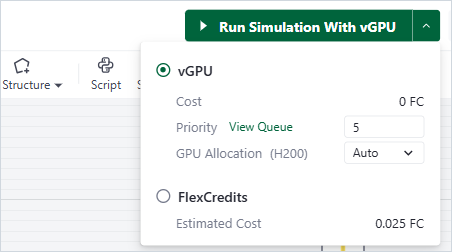
Run options
- Click Check Simulation and wait for Validation Passed.
- The button reads Run Simulation With vGPU: vGPU is chosen. To change it, click the arrow next to the button.
- Choose vGPU or FlexCredits:
- vGPU: Cost is 0 FC. Set Priority and GPU Allocation.
- FlexCredits: the run costs the Estimated Cost.
- Click the button to start the run.
Each project starts with vGPU, priority 5 and allocation Auto. Sweeps offer the same choice (Run Sweep With vGPU).
# Priority and GPU Allocation
- Priority sets the order in your company's queue, from 1 (lowest) to 10 (highest). A simulation with a higher priority starts first. View Queue opens the Virtual GPU Scheduler in a new tab.
- GPU Allocation sets how many vGPUs the run uses. Auto lets the cloud choose. A number, up to the vGPUs of your license, fixes it. The label shows the GPU type: an A100 has 80 GB of memory, an H200 140 GB.
# Memory Limit
After the check, the editor compares the Estimated GPU Memory of the simulation with the memory of the vGPUs that the run can use.
| Estimated memory | Result |
|---|---|
| Within the limit | vGPU can run it. |
| Up to 2 times the limit | Warning: "Estimated vGPU memory is over the limit of … GB. You can ignore memory limit and run the simulation, but it might run out of memory." Tick Ignore Memory Limit to run with vGPU anyway, or choose FlexCredits. |
| More than 2 times the limit | vGPU cannot run it: "… To run the simulation, use FlexCredits instead." |
When vGPU cannot run the simulation, the status reads Can't run (why?) and the button reads Run Simulation (select method). Click the arrow and choose FlexCredits.
# While the Run Waits
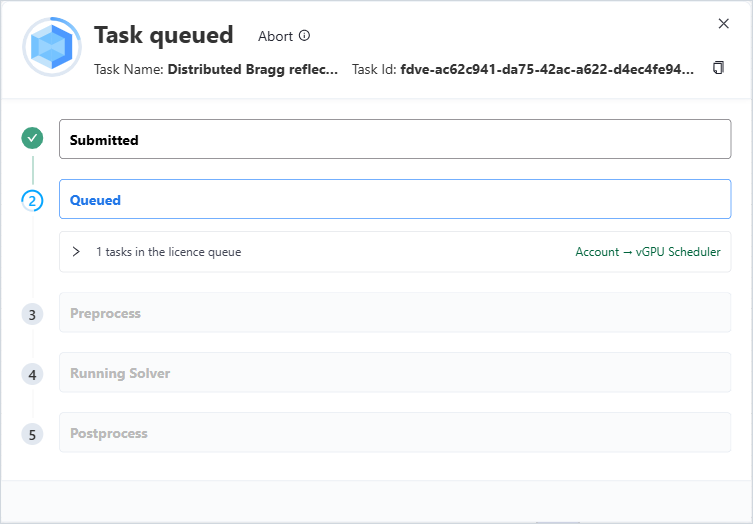
Progress window of a vGPU run
In the progress window, the Queued step shows how many simulations are in your company's queue. Click it to see them; your run is marked This simulation. Account → vGPU Scheduler opens the full queue.
# Common Mistakes
- Expecting the run to start at once. A vGPU run waits until enough vGPUs are free. Check the queue with View Queue.
- Ignoring the memory limit for a large simulation. The run can run out of memory and fail.