# Local Mesh Refinement
Local Mesh Refinement defines a local region that influences mesh generation without adding a physical structure to the model.
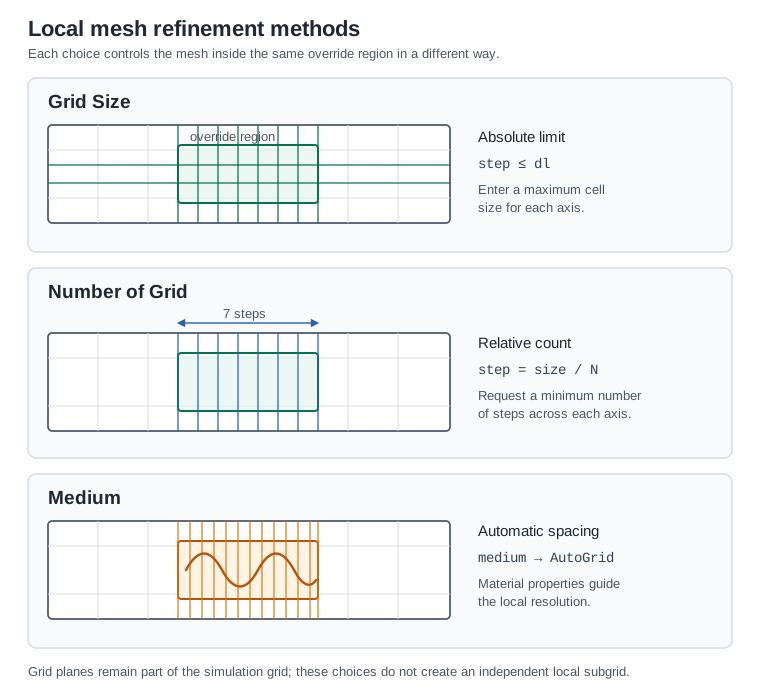
The Grid Size and Number of Grid choices correspond to tidy3d.MeshOverrideStructure (opens new window). The Medium choice uses a medium-bearing structure as a grid override.
Local mesh refinement is commonly used to refine conductors, dielectric gaps, feeds, ports, and regions with strong field variation.
# Name
name: Unique name for the override structure.
- Required field
# Geometry
Specification of the override region.
# Center + Size
Object definition through a center position and size.
center: Center of the override region in x, y, and z-directions.
- Type: floating-point number
- Unit: m, mm (default unit), um
size: Size of the override region in x, y, and z-directions.
- Type: floating-point number
- Unit: m, mm (default unit), um
- Constraint: greater than or equal to 0
- Required field
# Bounds
Object definition through minimum and maximum coordinate bounds.
min: Values of the x, y, and z coordinates defining the lower corner of the override region.
- Type: floating-point number
- Unit: m, mm (default unit), um
- Required field
max: Values of the x, y, and z coordinates defining the upper corner of the override region.
- Type: floating-point number
- Unit: m, mm (default unit), um
- Required field
# Override Type
override_type: Method used to define the mesh override.
- Options: Grid Size/Number of Grid/Medium
- Required field
# Grid Size
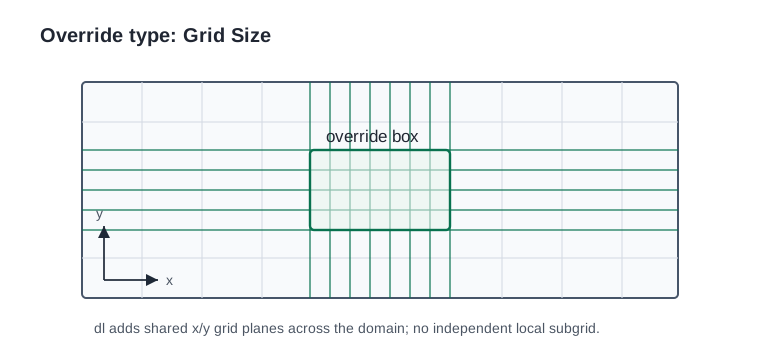
Select Grid Size to enter an absolute maximum grid step along each axis.
dl: Maximum grid size along x, y, and z-directions inside the override region.
- GUI label: Grid Size
- Type: three optional floating-point numbers
- Unit: m, mm (default unit), um
- Constraint: greater than 0 when specified
- Default: None for each axis
NOTE
If one direction in dl is empty or set to None, Grid Size does not refine that direction. Grid-size overrides add shared grid planes along each axis, so the planes can extend outside the override box.
# Number of Grid
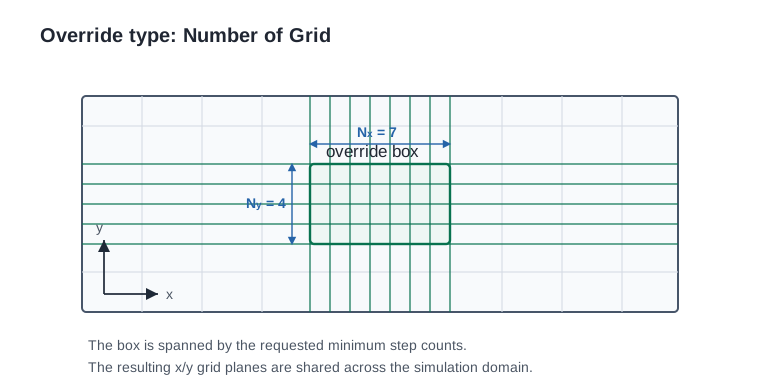
Select Number of Grid to set the minimum number of grid steps that span the override region along each axis.
min_steps_per_size: Minimum number of grid steps across the override region in the x-, y-, and z-directions.
- GUI label: Number of Grid
- Type: three optional floating-point numbers
- Unit: unitless
- Constraint: greater than 0 when specified
- Default: None for each axis
For a finite, nonzero override-region size, the target grid step along an axis is:
target grid step = override-region size / min_steps_per_size
NOTE
If one direction in min_steps_per_size is empty or set to None, Number of Grid does not refine that direction. The value is ignored when the override-region size is 0 or infinite along that axis.
When both dl and min_steps_per_size are set through the API, the automatic mesher uses the finer grid requested by the two values.
# Medium
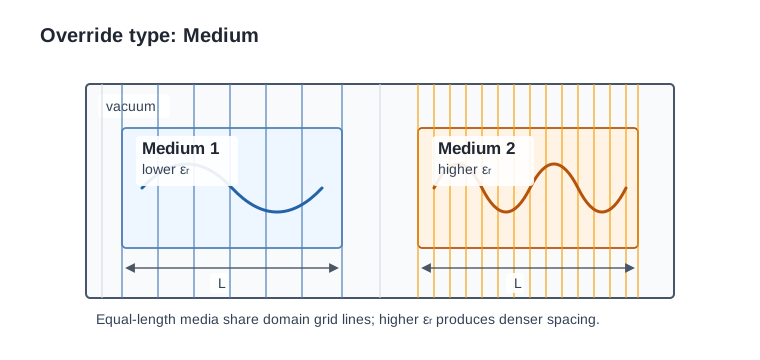
Select Medium to choose a material that guides automatic mesh resolution inside the override region.
medium: Medium used by the automatic mesher in the override region.
- GUI label: Medium
- Type: Medium
- Required field when Medium is selected
NOTE
The selected medium is assigned to a structure in the grid override collection. It influences grid generation but does not add a physical structure to the simulation. Material properties such as higher permittivity can request denser automatic grid spacing.
# Advanced
These settings are available when Grid Size or Number of Grid is selected. They are not displayed for Medium.
enforce: Toggle whether the override is enforced even where another structure would request a smaller grid size.
- Options:
- True: Enforce the override inside the override region.
- False: Allow finer grid requests to take precedence.
- Default: False
shadow: Toggle how overlapping override structures are prioritized.
- Options:
- True: In overlapping regions, the later override structure can shadow earlier override structures.
- False: In overlapping regions, use the smaller grid size.
- Default: True
drop_outside_sim: Toggle whether portions outside the simulation domain are ignored.
- Options:
- True: Drop portions of the override region outside the simulation domain.
- False: Apply the override where its projection overlaps the simulation domain.
- Default: True
NOTE
Mesh override structures are used by grid generation when at least one grid direction uses AutoGrid or QuasiUniformGrid.