
# Sources
Editor: Setup › Sources
A source sends light into the simulation. Its type sets where and how the light starts, for example a guided mode in a waveguide or a plane wave. Its Excitation Signal sets the time shape of the light. The default, a Gaussian Pulse, covers a whole wavelength range in one run.
# Add a Source
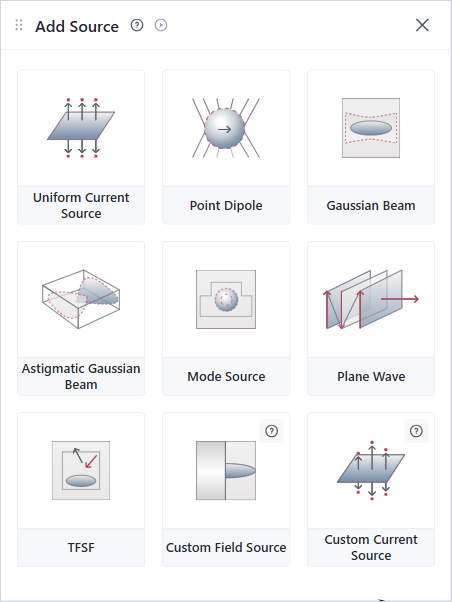
Add Source panel
- In Setup › Sources, click +.
- Click a source type. The editor adds the source. Custom Field Source and Custom Current Source first ask for a data file.
- In the source's form, set its position, size, direction and wavelength range.
# How to Choose
| If you want to … | Use |
|---|---|
| Send a guided mode into a waveguide | Mode Source |
| Light a periodic structure, such as a grating or a metasurface | Plane Wave |
| Model a focused beam, for example from a fiber | Gaussian Beam, or Astigmatic Gaussian Beam for an elliptical beam |
| Model a small emitter, such as a molecule or a quantum dot | Point Dipole |
| Light a finite object with a plane wave, and see the scattered light outside a box | TFSF |
| Apply a current over a plane or a volume | Uniform Current Source |
| Use fields or currents from your own data | Custom Field Source or Custom Current Source |
# Common Mistakes
- The monitors record wavelengths outside the source's range. The check then warns. See FDTD Troubleshooting.
- A Plane Wave at an angle, with PML on its sides. The check stops with an error. Use Bloch boundaries that match the angle, or an angle of 0.
- A Plane Wave or Gaussian Beam whose plane crosses more than one medium. The check stops with "Plane must be homogeneous". Move the source plane into one medium.
# Source Time Types
# GaussianPulse
Source time dependence that describes a Gaussian pulse.
See: GaussianPulse
# ContinuousWave
Source time dependence that ramps smoothly to a continuous oscillation.
See: ContinuousWave
# CustomSourceTime
Source time dependence defined by a user-supplied envelope and carrier frequency.
See: CustomSourceTime
# Baseband Source Time Types
Baseband source time types produce time-domain waveforms without a carrier frequency. For a new source, the Source Time selector offers Gaussian Pulse, Continuous Wave, and Custom Source Time. It shows a baseband type only when the source already uses one, for example a source created with the Python interface.
- BasebandStep: Step function with smooth ramp-up.
- BasebandGaussianPulse: Gaussian envelope at zero frequency.
- BasebandRectangularPulse: Rectangular pulse with smooth transitions.
- BasebandCustomSourceTime: User-defined baseband waveform.
# Related Content
- Sources Tutorial (opens new window)
- Defining mode sources and monitors (opens new window)
- Injecting modes in bent and angled waveguides (opens new window)
- Defining a total-field scattered-field (TFSF) plane wave source (opens new window)
- FAQ: What source bandwidth should I use? (opens new window)
- FAQ: How are results normalized? (opens new window)