# Medium2D
Medium2D defines a two-dimensional diagonally anisotropic medium.
This object corresponds to tidy3d.Medium2D (opens new window).
# Name
name: Optional unique name for the medium.
# Type
type: Medium model used by this material entry.
- Options: Medium2D
# Color
color: Display color used for the medium in the GUI.
- Type: color
- Default: automatically assigned by the GUI
# General Properties
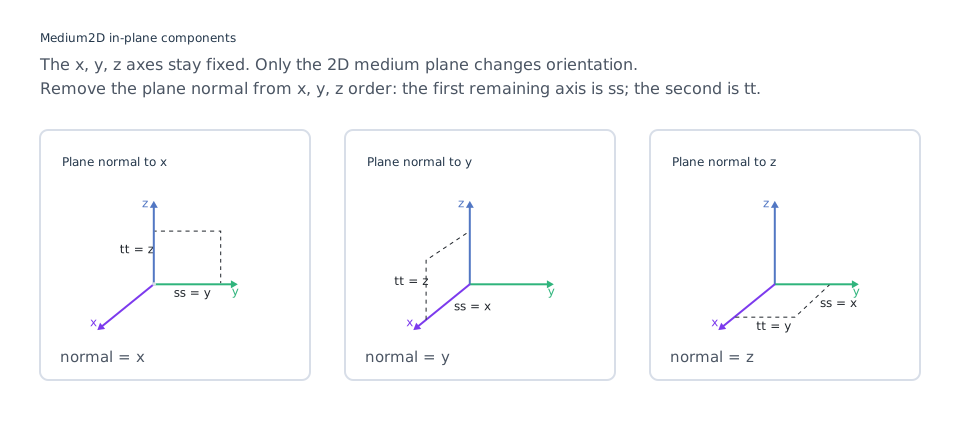
The ss and tt fields define the two in-plane components of the diagonal permittivity tensor.
| Field | In-plane component | Description | Required |
|---|---|---|---|
ss | first | Medium describing the first in-plane component. | Yes |
tt | second | Medium describing the second in-plane component. | Yes |
Supported options for both fields:
The ss and tt components refer to the two in-plane dimensions. For example, if the 2D material is normal to the y-axis, ss maps to the x component and tt maps to the z component of the corresponding 3D medium.
# Advanced
set_from_global_frequency: Toggle whether the frequency range is set from the Global Settings frequency range.
- Options:
- True: Use the global frequency range and disable manual frequency range inputs.
- False: Manually set
frequency_range.
frequency_range: Optional range of validity for the medium.
- Type: two float numbers
- Unit: Hz, kHz, MHz, GHz (default unit), THz
- Default: None
allow_gain: Toggle whether the medium is allowed to be active.
- Options: True/False
- Default: False
NOTE
Only diagonal anisotropy is supported for Medium2D.